


-doq5lydusg.webp)
The web push ecosystem is changing fast, and the period between 2024 and 2026 has brought the most significant updates in the history of the technology. Google Chrome has introduced several aggressive mechanisms designed to protect users from spam, deceptive content, and notification overload.
For publishers and brands, the message from Google is clearer than ever: quality and engagement are the only ways to maintain a healthy subscriber base. If your strategy doesn't evolve, your domain risks being throttled or silenced entirely by the browser.
The good news? With the right strategy, you can stay ahead of these changes – and even strengthen the quality of your audience.
Below is a breakdown of what Chrome changed, what it means for your push performance, and what we at PushPushGo recommend based on our data.
To understand the current landscape, we have to look at how Google has systematically prioritized the user experience over the last few years.
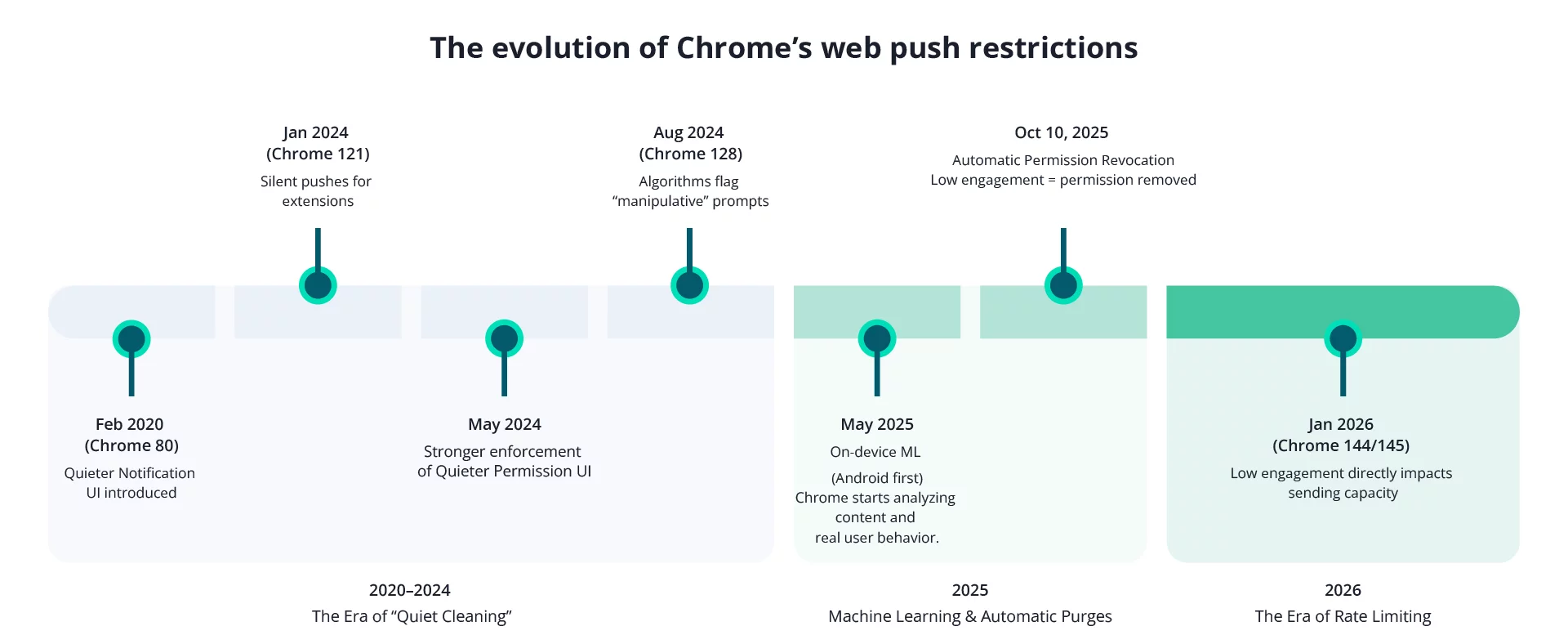
Google began by targeting intrusive permission prompts and "noisy" environments.
February 2020 (Chrome 80)
Google introduces the Quieter Notification UI. This replaced intrusive pop-ups with a bell icon in the address bar for sites with low opt-in rates or for users who frequently block requests.

Introduced "silent pushes" for extensions to reduce visual clutter.
Aggressive application of the Quieter Permission UI, automatically silencing opt-in windows on sites with low user acceptance rates.
Algorithms began flagging "manipulative" prompts, such as those that hide content until a user clicks "Allow."
This was the year Chrome began "reading" content and managing user lists based on real-world interaction.
Chrome rolled out an on-device machine learning model that evaluates notification content before it appears on a user’s screen.
This system:
If a notification appears harmful or looks like spam, Chrome can:
✅ show a warning, or
✅ automatically unsubscribe the user from that website’s notifications.

Example of a notification identified as potentially spammy
This update applies primarily to Android, but the logic influences Chrome’s broader anti-spam strategy.
On October 10, 2025, Chrome announced a new step - automatically revoking notification permission from sites with low user engagement.
Here’s how it works:
If users haven’t interacted with your site recently and your notifications are ignored or dismissed, Chrome may unsubscribe them automatically and show a message such as:
“Chrome unsubscribed you from notifications due to low activity.”

Users can re-enable notifications through Safety Check, but for many websites, this has caused a noticeable drop in subscriber numbers.
Chrome’s own tests showed a big reduction in unwanted notifications with minimal loss of meaningful engagement - but for publishers who send more frequently, the impact is already visible.
As of January 2026 (Chrome 144/145), Google has introduced Push API rate limits as a direct consequence of low engagement.
Every day, Chrome calculates whether a site is "disruptive" based on three specific pillars of engagement:
If your site is identified as sending a high volume of notifications with very little user engagement, Chrome triggers the following:
Chrome’s goal is not to punish legitimate publishers. Their data shows that these changes help boost engagement for sites that send meaningful, targeted, and relevant notifications.
The official Chrome documentation emphasizes that "nearly all websites will be unaffected by this change." The limit is specifically targeted at a small number of sites that use the Push API as a "megaphone" rather than a precision tool. As a result, you may see:
If you answer "No" to any of the following, your delivery rates are likely being throttled:
Based on our data at PushPushGo, we have identified clear patterns and actionable ways to stay ahead of these changes.
1. Focus on truthful, high-quality content
Chrome’s ML checks whether notifications:
Avoid vague or exaggerated messaging. Be specific, honest, and helpful. Quality of engagement matters more than the quantity of subscribers.
2. Target your campaigns – don’t rely on mass sends
Sites sending mostly mass campaigns are affected the most by the new limits. Use segmentation, behavioral triggers, and category preferences. Personalized messaging keeps engagement high and prevents Chrome from reducing your reach.
3. Monitor sending frequency
Avoid exceeding 4 notifications per day unless you see strong user engagement that justifies more frequent communication.
Excessive frequency is one of the clearest triggers for Chrome’s automated filters.
You can also set up capping, a maximum number of notifications a subscriber can receive per day. To enable this feature, please contact our support team at support@pushpushgo.com.
2. Maintain a minimum 4-hour interval between campaigns
Sending campaigns too close together can:
Spacing messages protects your deliverability.
5. Watch your engagement metrics closely
Chrome considers user interaction signals. If a segment hasn’t engaged for a long time:
Quality of engagement matters more than quantity of subscribers.
6. Complement push with onsite notifications and pop-ups
If Chrome blocks or revokes permissions, on-site communication tools help you:
Chrome’s updates push the industry toward relevance, transparency, and user protection. This is good news for companies that:
And a challenge for those relying on volume alone.
But with thoughtful adjustments and the right tooling, you can maintain a strong subscriber base and even improve your engagement.
At PushPushGo, we’re monitoring Chrome’s changes closely and adjusting our best practices based on real data from our clients. We will continue sharing new insights and recommendations as Google rolls out additional updates.
Passionate about advertising, digital technologies and marketing itself. Life motto: "Growth starts out of the comfort zone".
.png)
.png)
-3pf2xltbnb.webp)

Mi tincidunt elit, id quisque ligula ac diam, amet. Vel etiam suspendisse morbi eleifend faucibus eget vestibulum felis. Dictum quis montes, sit sit. Tellus aliquam enim urna, etiam. Mauris posuere vulputate arcu amet, vitae nisi, tellus tincidunt. At feugiat sapien varius id.
Eget quis mi enim, leo lacinia pharetra, semper. Eget in volutpat mollis at volutpat lectus velit, sed auctor. Porttitor fames arcu quis fusce augue enim. Quis at habitant diam at. Suscipit tristique risus, at donec. In turpis vel et quam imperdiet. Ipsum molestie aliquet sodales id est ac volutpat.

Elit nisi in eleifend sed nisi. Pulvinar at orci, proin imperdiet commodo consectetur convallis risus. Sed condimentum enim dignissim adipiscing faucibus consequat, urna. Viverra purus et erat auctor aliquam. Risus, volutpat vulputate posuere purus sit congue convallis aliquet. Arcu id augue ut feugiat donec porttitor neque. Mauris, neque ultricies eu vestibulum, bibendum quam lorem id. Dolor lacus, eget nunc lectus in tellus, pharetra, porttitor.
"Ipsum sit mattis nulla quam nulla. Gravida id gravida ac enim mauris id. Non pellentesque congue eget consectetur turpis. Sapien, dictum molestie sem tempor. Diam elit, orci, tincidunt aenean tempus."
Tristique odio senectus nam posuere ornare leo metus, ultricies. Blandit duis ultricies vulputate morbi feugiat cras placerat elit. Aliquam tellus lorem sed ac. Montes, sed mattis pellentesque suscipit accumsan. Cursus viverra aenean magna risus elementum faucibus molestie pellentesque. Arcu ultricies sed mauris vestibulum.
Morbi sed imperdiet in ipsum, adipiscing elit dui lectus. Tellus id scelerisque est ultricies ultricies. Duis est sit sed leo nisl, blandit elit sagittis. Quisque tristique consequat quam sed. Nisl at scelerisque amet nulla purus habitasse.
Nunc sed faucibus bibendum feugiat sed interdum. Ipsum egestas condimentum mi massa. In tincidunt pharetra consectetur sed duis facilisis metus. Etiam egestas in nec sed et. Quis lobortis at sit dictum eget nibh tortor commodo cursus.
Odio felis sagittis, morbi feugiat tortor vitae feugiat fusce aliquet. Nam elementum urna nisi aliquet erat dolor enim. Ornare id morbi eget ipsum. Aliquam senectus neque ut id eget consectetur dictum. Donec posuere pharetra odio consequat scelerisque et, nunc tortor. Nulla adipiscing erat a erat. Condimentum lorem posuere gravida enim posuere cursus diam.