


Mobile push

Mobile push notifications - key factors

Last updated -
June 10, 2026
Author photo
Aleksandra Kozioł
6 min

Mobile push allows you to communicate with the users of your mobile app to keep them informed and make them return to your offer more frequently. They're not very different from web push in terms of user-friendliness on both sides of the line.

Mobile push in m-commerce

Mobile push is as old as smartphones themselves. They were introduced in the first iPhone and quickly spread among other devices. Mobile push has proven time and time again to be a simple way of building user loyalty and retention, as well as driving sales.

After a while, the technology was altered to use web push notifications (or desktop push notifications) via websites instead of applications. But that's a wholly different story. If you want to learn more about push notifications, check out one of our other blog posts. This time, we're concentrating on mobile push services in PushPushGo.

Implementing mobile push in the application

Unlike web push notifications, mobile push requires more preparation. Those depend on the technology in which the app is written. In PushPushGo we have a dedicated SDK for mobile push implementation for Flutter, Swift, and Kotlin technologies.

In the process of implementation, the beacons are set up. Those work similarly to web push notification segments, allowing us to track mobile push subscribers and their activities in the application. It's better to have your mobile push strategy thought out beforehand. This is how you'll know what you want to track for your app push notifications and employ the needs to get it.

Mobile push subscribers

App users can opt-in to mobile push after they install the application and launch it for the first time. This is when a system prompt appears. There's also a possibility to enable push notifications afterwards, by allowing app notifications in the device settings.

Both Android and iOS operating systems require the app user's opt-in. This is to prevent unwanted mobile push notifications from popping up on the devices. Furthermore, the operating system can also hibernate unused applications.

This means that the apps which weren't used for a given period, won't be able to send mobile push notifications, even if they were previously allowed on the mobile device. This puts an even bigger emphasis on keeping app users in the loop, making them come back to the app as often as possible.

Mobile push subscribers can be tracked based on their activities in the application. This allows you to send them targeted mobile push as well as notifications via automation scenarios.
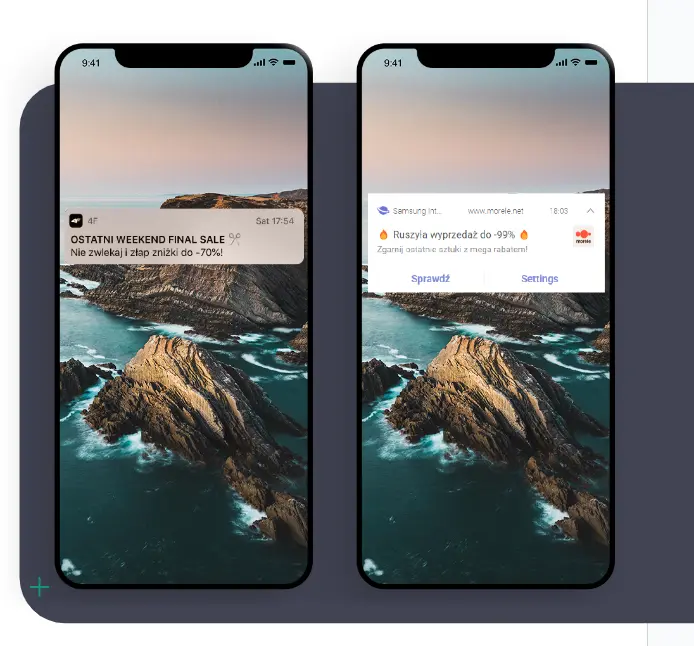
mobile push examples

Mobile push campaigns

Just as with web push, you can send different types of mobile push notifications. They differ in terms of recipients.

Mobile push mass campaigns

Mass campaigns are the simplest, most straightforward type of push notifications. They are sent to the entire subscriber base. They are also the simplest in terms of preparation. It takes just minutes to send push notifications in the form of a mass campaign. That's why they play a vital role in any push notification strategy.

Mass push notifications can be used to:

  • promote new arrivals
  • advertise special offers and sales
  • inform about matters important to your users

In the case of mass push notifications, we advise quality over quantity. The general rule of thumb for both mobile push and web push is to send no more than 4 mass campaigns per month. Additional push messages can be sent as targeted campaigns and automation scenarios.

Mobile push targeted campaigns

Targeted campaigns allow you to personalize communication with your app users. Based on information collected via beacons you can address portions of your subscriber base with push notifications better attuned to their interests and expectations.

The targeting can include push notifications advertising specific offers or product categories. For example, if you're running a clothes shop, you may limit mobile push about new skirts to reach app users previously interested in women's fashion. Of course, there are more sophisticated ways to employ targeting:

  • Geolocation (if enabled) - advertise special offers in the area where the app user is currently present. It's especially useful if you're operating brick-and-mortar stores apart from a mobile application
  • Time since last visit - send push notifications to users who haven't visited your application in a defined period
  • Visited categories - by learning about which categories were visited, you can send mobile push campaigns advertising specific products or subcategories in this specific range

Targeted push notifications build more personalized communication. This, in time, enhances loyalty, higher return rates, and more conversions.

Automation scenarios with mobile push

Mobile push notifications can be personalized even further with automation scenarios. Like targeted campaigns mentioned before, scenarios are based on the data collected through beacons. After the initial set up they are sent automatically in response to specific actions taken by the app users.

Automation scenarios provide real-time communication when it's the most important.

  • abandoned cart - this scenario is triggered when a mobile user adds items to the cart but leaves the app without finishing the transaction. After a pre-defined period, this subscriber receives a mobile push reminding them about the unfinished deal.
  • last seen offer - this scenario is triggered when a mobile user browses products in the application but leaves without adding anything to the cart. With mobile push notifications, you can remind them about the last offer that caught their interest, driving sales.
  • return to the app - you can set up this scenario to contact a mobile user who subscribed to mobile push notifications but hasn't visited the site since then. A push notification can serve as an invitation to return. It may provide another incentive, like information about a new product or special offer.
  • buy now - if a mobile user visits the app often but doesn't make a purchase, you can address them via a mobile push notification to encourage them to buy. This scenario can also include a promo code or other incentive to shop.
  • review a purchase - if an app user finally makes a purchase, you can ask them for an opinion via app notification. Gathering reviews can be tricky, but mobile push provides you with a simple tool to direct subscribers directly to the right place.
  • thank-you push notifications - this is another form of post-purchase communication. When your mobile user buys something, you can thank them for the transaction via mobile push notification. The mobile push can include a promo code for their next purchase or suggestions for cross-selling products.
  • welcome message - a mobile push notification expressing your gratitude for enabling push notifications and informing your new subscribers what to expect from this channel of communication.

Mobile app push notifications provide you with a plethora of options to personalize your communication. This means driving more engaged users which drives more sales and returns to the mobile app. In your mobile push notification strategy, you should make sure you employ all three forms: mass, targeted, and automation.
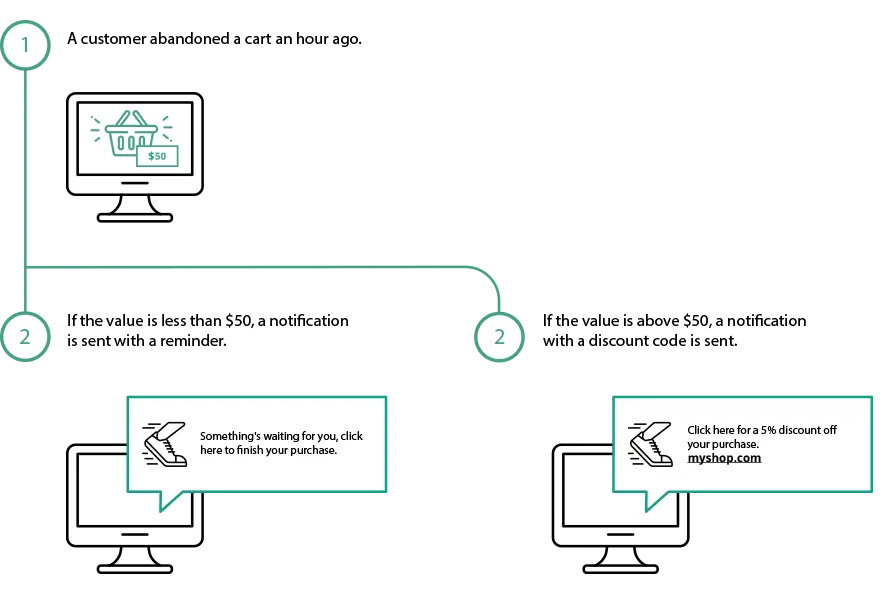
mobile push abandoned cart

Additional settings of mobile push notifications

The size and shape of a mobile app push notifications are directly related to the operating system of a mobile device. It means that their appearance differs between mobile operating systems. However, on a mobile device, all push notifications look the same, no matter which app sends them.

Visual settings in mobile push

There are still some ways to stand out from the crowd. This is how you can guarantee that your mobile notifications are easily recognizable to your app users.

  • company logo - you can add your company logo to display in all your mobile notifications
  • large image - a large image can help you to catch the eye of your mobile users and make them more interested in push notification content
  • emojis - their usage depends on the tone of voice you employ across your communication channels. If you opt for a more quirky way to address your users on their mobile devices, you can add them both to the subject line or main content.

Action buttons in mobile notifications

Action buttons can be added to make mobile push notifications more interactive. Adding up to two additional buttons to a mobile push gives the app users a chance to engage with the notification on their terms. For example, you can show them a product you're promoting, giving them a choice to see it in different color settings. All in one mobile push.

Daily capping

If a lot is going on and many push notifications are being sent in a day, you may want to consider your app users' experience. It can dwindle if mobile users feel like they're being spammed with messages.

It can be prevented if you use mobile push capping. This way you can ensure that your users don't get too many push notifications per day. You can set up a number that suits your needs best.

Push notifications users

Mobile push notifications are a must for any mobile application. As mobile users, we can see it for ourselves. The interest in an application falls gradually, the more time passes from the installation. That's why staying in touch is crucial to drive engagement and keep the users informed.

Mobile push notifications work not only in m-commerce. They're useful in any form of mobile app - from stores to services, mobile games, publishers, and more. Anywhere they are mobile users - you want to keep in touch with them.

Mobile push service in PushPushGo

In PushPushGo, we work with different kinds of companies - varying in size and sectors - helping them to bring out the most from their web and mobile push communication. We help them out with the implementation, creating a push notification strategy, and analyzing the results of their push notification campaigns.
4f mobile push case study

You can see our case study with 4F and see how the cooperation with PushPushGo looks like. 

If you want to implement mobile notifications in your service, or you wonder what more can you get from the mobile push, let us know. Contact us at hello@pushpushgo.com. We're sure we can figure something out.

Aleksandra Kozioł
Content Specialist @PushPushGo

Editor and writer. She is interested in media and new technologies. 

Also on PushPushGo blog

Web push

40+ Push Notification Examples for Ecommerce, Media, SaaS and Apps

A practical collection of 40+ push notification examples for ecommerce, media, SaaS, mobile apps and transactional messages. The article shows how to create more effective notifications by focusing on the right timing, audience, message and call to action, with real examples you can easily adapt to your own campaigns.
August 17, 2026
16 min
Online marketing inisghts

Cart abandonment email best practices: 12 ways to recover more sales

Learn abandoned cart email best practices that help ecommerce brands recover lost sales with stronger timing, content, offers and cart recovery strategies.
July 30, 2026
23 min
Online marketing inisghts
Web push
Mobile push

Push notification strategy: build yours for 2026

Learn how to build a push notification strategy that brings users back, improves retention, and supports sales without annoying your audience.
May 28, 2026
25 min

Start your free trial

Web push | Mobile push | Transactional notifications
Onsite notifications | Pop-up | In-app | WhatsApp channels
Start a 14-day trial!
Mountains
Written by
Alec Whitten
Published on
17 January 2022

Introduction

Mi tincidunt elit, id quisque ligula ac diam, amet. Vel etiam suspendisse morbi eleifend faucibus eget vestibulum felis. Dictum quis montes, sit sit. Tellus aliquam enim urna, etiam. Mauris posuere vulputate arcu amet, vitae nisi, tellus tincidunt. At feugiat sapien varius id.

Eget quis mi enim, leo lacinia pharetra, semper. Eget in volutpat mollis at volutpat lectus velit, sed auctor. Porttitor fames arcu quis fusce augue enim. Quis at habitant diam at. Suscipit tristique risus, at donec. In turpis vel et quam imperdiet. Ipsum molestie aliquet sodales id est ac volutpat.

Office setting
Image caption goes here
Dolor enim eu tortor urna sed duis nulla. Aliquam vestibulum, nulla odio nisl vitae. In aliquet pellentesque aenean hac vestibulum turpis mi bibendum diam. Tempor integer aliquam in vitae malesuada fringilla.

Elit nisi in eleifend sed nisi. Pulvinar at orci, proin imperdiet commodo consectetur convallis risus. Sed condimentum enim dignissim adipiscing faucibus consequat, urna. Viverra purus et erat auctor aliquam. Risus, volutpat vulputate posuere purus sit congue convallis aliquet. Arcu id augue ut feugiat donec porttitor neque. Mauris, neque ultricies eu vestibulum, bibendum quam lorem id. Dolor lacus, eget nunc lectus in tellus, pharetra, porttitor.

"Ipsum sit mattis nulla quam nulla. Gravida id gravida ac enim mauris id. Non pellentesque congue eget consectetur turpis. Sapien, dictum molestie sem tempor. Diam elit, orci, tincidunt aenean tempus."

Tristique odio senectus nam posuere ornare leo metus, ultricies. Blandit duis ultricies vulputate morbi feugiat cras placerat elit. Aliquam tellus lorem sed ac. Montes, sed mattis pellentesque suscipit accumsan. Cursus viverra aenean magna risus elementum faucibus molestie pellentesque. Arcu ultricies sed mauris vestibulum.

Conclusion

Morbi sed imperdiet in ipsum, adipiscing elit dui lectus. Tellus id scelerisque est ultricies ultricies. Duis est sit sed leo nisl, blandit elit sagittis. Quisque tristique consequat quam sed. Nisl at scelerisque amet nulla purus habitasse.

Nunc sed faucibus bibendum feugiat sed interdum. Ipsum egestas condimentum mi massa. In tincidunt pharetra consectetur sed duis facilisis metus. Etiam egestas in nec sed et. Quis lobortis at sit dictum eget nibh tortor commodo cursus.

Odio felis sagittis, morbi feugiat tortor vitae feugiat fusce aliquet. Nam elementum urna nisi aliquet erat dolor enim. Ornare id morbi eget ipsum. Aliquam senectus neque ut id eget consectetur dictum. Donec posuere pharetra odio consequat scelerisque et, nunc tortor. Nulla adipiscing erat a erat. Condimentum lorem posuere gravida enim posuere cursus diam.

Weekly newsletter
No spam. Just the latest releases and tips, interesting articles, and exclusive interviews in your inbox every week.
Read about our privacy policy.
Thank you! Your submission has been received!
Oops! Something went wrong while submitting the form.