




Even the best-designed campaigns sometimes fail to reach subscribers. There are many reasons why push notifications do not reach their recipients. In this article, we have collected the most common reasons for this. Some can be counteracted by adjusting the app settings.
When we talk about subscribers not getting our push notifications, this can refer to two issues. First, sometimes push notifications are not sent to customers. This may be related to the application settings - and we will address these issues first. The second situation is related to subscribers not seeing and opening push notifications. Here we will describe the most common reasons by which users do not see push notifications sent.
Application settings often affect the deliverability of push notifications. PushPushGo's features provide a number of methods for segmenting and adjusting your campaigns. If you notice that sent campaigns have low deliverability, pay attention to the options used.
Dividing customers according to specific criteria allows you to send targeted campaigns. This is a good alternative to mass campaigns, allowing you to carve out relevant groups most interested in given offers.
Examples can be many. Segmentation based on geolocation helps reach customers closest to the stationary store with either an interesting offer or the most important news from the region.
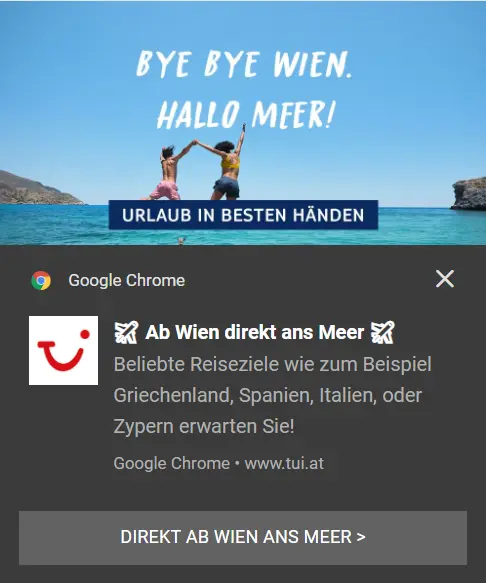
Sometimes, however, this narrowing of the subscriber group can result in few people receiving a message that may be of interest to them.
Automation is one of the best tools in a marketer's arsenal. Sending automated personalized messages based on subscribers' recent actions often leads to purchase decisions and builds brand loyalty. On the other hand - in order to receive a web push based on an automation scenario, the user must meet specific conditions included in the scenario.
If the subscriber does not take the specific action, the notification will not be sent at all. Pay attention to the scenarios that have been implemented in your organization.
The "Expire Date" setting is an option that allows you to limit the number of notifications that appear on subscribers' devices. With this setting, we avoid the situation where a subscriber turning on his device after a few days gets a dozen notifications at once that he missed. The expiration time is also useful for promoting opportunities that last only a few hours, or, in the case of news portals, for last-minute news.
On the other hand, expire date settings mean that subscribers will never see messages that have already expired.

Sometimes problems arise from technical issues. If during the change from simple integration to integration with your own domain you add a service worker to the site, even though some was already implemented before, this will lead to a decrease in the deliverability of notifications. Two service workers "bite" each other.
This is a new service offered to enterprise customers in PushPushGo. Its principles are simple - in the application, you can set a limit on the number of push notifications that go to a given subscriber per day. Once a person receives a set number of pushes, subsequent campaigns sent that day will not go to him or her. Capping allows you to limit notifications to a level that will not be considered annoying.
Daily capping is an additional service for enterprise customers, so its implementation is not forced in any way. In addition, customers who choose to use this option have the option to skip capping limits on individual campaigns.
Even the best thought-out campaigns with perfectly configured parameters can go unnoticed for reasons completely beyond our control. It's worth knowing about some of the factors that surface when subscribers don't see the notifications sent to them:
The topic of changes in the latest Windows is so broad that it lived to be discussed in a separate text. The system is advertised as an ideal tool for work and entertainment, so a number of options are included to tailor its functions to the user's activities. One of the settings is focus mode. If it is enabled, the system automatically does not show the user notifications, so he can focus on playing games or working.
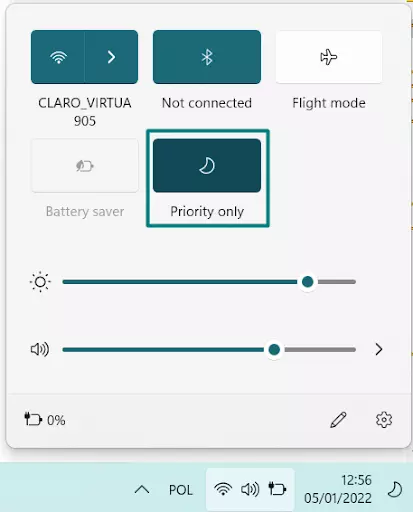
Windows 11 also introduced a notification center, where it collects system notifications and notifications from websites. Its operation can be changed through a number of system settings.
Apple computer owners can also customize notification options on their own. For macOS, it's worth noting that push notifications are smaller than on Windows. The graphics attached to the pushes are also hidden by default.
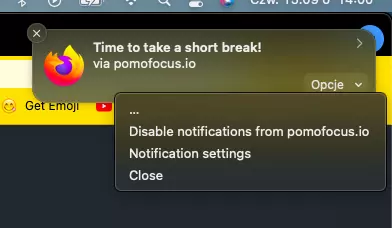
According to the analysis we collected in our report about the use of web push in the e-commerce industry, Firefox browser users accounted for only 1.10% of push subscribers in 2021. It is worth mentioning, however, that Mozilla's browser imposes some restrictions on the delivery of notifications. In the name of convenience for users, notifications from sites that have not been visited by subscribers for a long time will be not delivered.
Sometimes it seems like we spend most of the day looking for a charger or a contact to plug our smartphones into power. When devices go into power-saving mode, they turn off unnecessary functions - including the display of push notifications. How many times has such a situation surprised us in the middle of the day?
We cannot guarantee that at the time of sending the campaign the subscriber is not trying to defeat a dragon in a game that automatically turns on focus mode. Nor that his smartphone battery just happens to be dead. But we know how to send good campaigns!
If you want to learn more and get advice on how to further improve your statistics, contact us: support@pushpushgo.com
Editor and writer. She is interested in media and new technologies.
.png)
.png)
.png)