Since iOS 16.4, Apple has enabled support for web push notifications across browsers on iPhone and iPad - finally bringing iOS closer to Android in terms of web app capabilities. Notifications on iPhone and iPad are delivered through Apple Push Notification Service (APNs), appearing just like native app notifications on the lock screen and in the Notification Center.
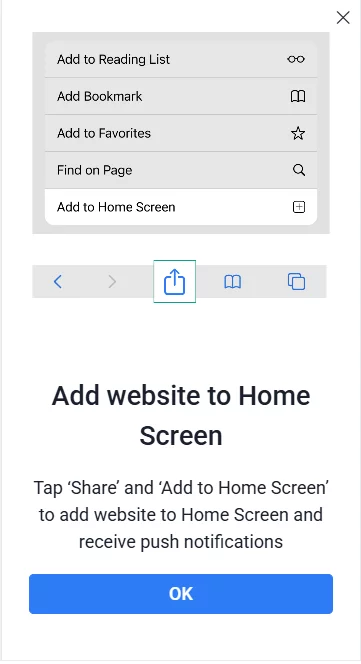
However, there’s one key difference: to receive web push notifications, users must first add your website to their Home Screen. Only then can the native permission prompt appear, following a direct interaction (like tapping a button) inside the web app.
Increase your iOS web push subscriber base by helping users complete the setup in just a few taps.
With PushPushGo, you can easily guide visitors through this process. Our ready-to-use pop-up templates show clear instructions on how to pin your site to the home screen and enable push notifications.
You can target these pop-ups specifically to users who haven’t subscribed yet, ensuring your message reaches the right audience at the right time.