

Web push
Mobile push

Mastering the reader journey: essential strategies for engagement

Last updated -
June 10, 2026
Author photo
Aleksandra Kozioł
7 min
© by funky-data from Getty Images Signature via Canva Pro

🎧Listen to this article here.

In e-commerce, customer journey is the complete experience a customer has with a brand, from initial awareness through consideration, purchase, and post-purchase interactions. It maps each step and touchpoint a customer goes through while engaging with a product or service.

But as online users, we're not exclusively customers - sometimes we're also there to be informed and entertained as readers. And that's a whole other journey. Some touch points remain the same, more often than not we're encouraged to buy or subscribe to paid services, thus becoming clients. Still, online publishers can use a variety of tools to build engagement and returns in their own special way, different to e-commerce and other businesses depending on digital marketing.

Let's take a look at some tools for building reader engagement. With PushPushGo's growing toolkit, publishers can create a user experience to deepen their interest and make them come back.

Omnichannel tools: notifications for on-site and off-site messages

Adopting an omnichannel strategy in online publishing means delivering a cohesive and seamless reader experience across all touchpoints. A user might start reading an article on their mobile browser, bookmark it on a desktop, and return later via a newsletter link without any disruption in flow or content continuity.

At its core, omnichannel is about integrated communication. That’s why editorial strategies today often mix emails, newsletters, web and mobile push notifications, and on-site communication tools, each designed to connect with the reader at different moments of their attention span or intent.

Web push notifications

Web push notifications are a cornerstone of modern reader engagement for online publishers. Their unobtrusive format and ease of setup make them an effective way to drive retention and increase article views, even when users are not actively on the site, as long as the browser is open or enabled in the background.

Web push operates on an opt-in basis, meaning only readers who grant permission will receive messages. Once subscribed, basic behavioral and device data is captured (such as article categories viewed or device type), and this becomes the foundation for segmenting audiences and sending personalized, timely content alerts. You can trigger automations such as:

  • Alerting users to breaking news in categories they care about
  • Reminding them to finish reading an in-depth feature
  • Sending a weekly digest of unread stories in a followed topic

Best practices for web push in online publishing

  • Drive return visits to newly published or recommended stories
  • Re-engage inactive readers with trending headlines
  • Notify about breaking news, updates to ongoing stories, or live event coverage
  • Highlight exclusive interviews or premium content previews
  • Promote special issues, series launches, or investigative pieces
  • Encourage newsletter sign-ups or app installs

Onsite notifications

Onsite notifications – clean, contextual, and minimal – are designed to assist and inform readers while they navigate your news site, without breaking their reading. Think of them as quiet nudges or editorial guidance that surfaces relevant information at the right moment.

These notifications are visible to all users and don’t require prior opt-in. Since they aren’t personalized across sessions, their power lies in real-time relevance. They adapt to the page, section, or context the user is actively exploring.

Despite their simplicity, publishers can build targeting scenarios based on session behavior to enhance reader experience and increase content consumption.

A table displaying the key differences wetween web push notifications and onsite notifications

Best practices for onsite notifications in online publishing

  • Increase pages per session by recommending related reads.
  • Guide readers through the push opt-in process, especially on iOS
  • Create urgency around limited-access stories or live coverage (“Live blog ongoing! Join now!”).
  • Highlight editor’s picks or trending stories based on the section the user is reading.
  • Guide users to comment sections, topic hubs, or contributor bios. This allows you to build a real time engagement.

Pop-up messages

Often considered intrusive when misused, pop-up notifications still play a valuable role in an online publisher’s toolkit. The somewhat flashy messages work best when they're a part of a broader communication strategy. They should also be designed and deployed to offer clear value rather than simply demand attention.

When evaluating whether to use a pop-up versus an onsite message, the key is to match format to purpose: pop-ups are for actions requiring active user input or decisions.

A table exploring the differences between pop-ups and onsite notifications.

Best practices for pop-up windows in online publishing

  • Display opt-in prompts to email newsletters, push notifications, or to follow favorite authors/topics.
  • Announce special editorial events, such as live Q&As, webinars, or AMAs, especially when timing matters.
  • Drive awareness for paywall offers, e.g. “Get unlimited access for $1/week”.
  • Run referral campaigns: “Invite a friend, get a free month of premium”.
  • Promote bundled access, like combined podcast + article subscriptions

Inbox and Topics – improve customer experience 

Two additional tools are linked directly to web push notifications. Both allow your readers to manage their messages better. 

Inbox allows you to store web push and onsite messages in the notification center on your website.
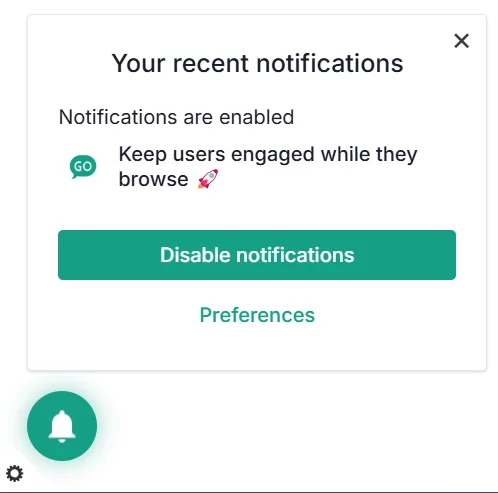
  • Empower your visitors to choose the messages they want to see and delete the rest.
  • Provide smart design - storing the Inbox under the bell widget saves the website from clutter.
  • Increase the visibility of your web push or onsite campaigns by sending them to Inbox as well.
  • Store updates on topics covered on your news portals, especially when important news breaks and is being updated.
Inbox serves as an archive for notifications - boh onsite messages and web push

And then there's Topics function - a tool allowing your users to choose the most interesting subjects during the web push opt-in process. An expanded opt-in prompt can be displayed to target visitors with a new incentive - the power to choose. You can create segments based on push subscribers' expressed interests.

Topics by PushPushGo allows users t choose the topics of their web push notifications

The journey and its steps

Here are some rules of thumb – best practices to kickstart on- and off-site communication with your readers and boost their on-site engagement as well as return rates.

We divided this category into two parts: at first, let's see how and when you can use the on-site messages to create the initial curiosity and incentivise visitors to subscribe to opt-in based channels, like e-mail and web push notifications. Then we'll follow up with just some of the most important aspects of web push: including their timing, custom events, targeting and adjusting content.

Attracting readers on a news website: onsite notifications and pop-ups

1. Awareness and entry to the site

Goal: Capture curiosity and demonstrate content relevance.

You can differentiate your welcome strategies between readers entering and browsing the main page (looking for something to catch their attention) and those starting from a specific url. For example, if they're here to read an article they clicked on their social media feed, a newsletter, etc., displaying a pop-up right from the get go - especially the kind that covers the content - might end in them leaving the site and vowing never to return.

2. Engaging the reader with on-site tools

Goal: Provide value, deepen interest, prompt further browsing, and build trust.

An example fot onsite notification scenario in online publishing. The aim is to attract website visitors and prolong their browsing time.. If a user clicks on a link on the main page, and they read a content , they receive an onsite message encouraging them to see other articles in the same category.

3. Retention and forming habits

Goal: Encourage return visits via reminders: display opt-in prompts for push, social media, and newsletters.

4. Conversion into subscribers

Goal: Convert engaged readers into paid subscribers if your magazine runs a paid subscription plan.

Post‑subscription communication: web push strategies

Goal: Welcome new subscribers, set expectations, and drive further engagement.

  • Build your push notification strategy. 
    • Differentiate between mass and targeted campaigns for updates important to all users and those for a selected sector of your readers. 
    • Monitor the performance of your web push campaigns. You can compare them to the findings of our annual report on web push performance in digital publishing.
    • Track the hours when your readers are the most active. Adjust your strategy to fit their day routines.
    • Use dialy capping to limit the number of web push notifications received daily by a subscriber.
Average number of push notifications sent weekly by some of the biggest news publishers in the world.

Source: Reuters Institute Digital News Report 2025

Learn and adjust for a seamless experience and higher conversion rates

From the moment a user enters your website, you can track their movements. The knowledge gives you better opportunities to address them in the most suitable matter. You can choose different tools to ask them to subscribe, visit more pages, download your mobile application etc. Collect your insights and grow.

  • Track campaign performance of your web push in the PushPushGo application to learn about your users' preferences.
  • Use path exploration to map reader flows and see drop‑off points in GA. Analyze the additional context and then optimize accordingly.

There are some more general rules to make the most out of messages on your website and off.

  • Avoid overly aggressive entry pop‑ups without value. Link pop‑ups to behavior and engagement to feel considerate.
  • Analyze notification content that works for your readers. Experiment with catchy headlines and comprehensive summaries. Remember that in a long term clickbait isn't your friend.
  • A/B test different triggers (time, scroll, exit) and formats (launcher vs full-screen) as well as content (notification title length, pictures, etc.).
  • Leverage social proof: “Join X readers,” or testimonials from readers and authors.
  • Offer a clear benefit: exclusive newsletters, bonus articles, and early access.
  • Respect UX: always have easy exit/close; mobile adaptation is critical.

Learn more about our notifications

PushPushGo has gone a long way from a web push service to a holistic communication hub with a number of different tools for publishers, online marketers, and other online businesses. And we believe that the more our customers know about our notifications, the better they can serve their subscribers and site visitors.

That's why in our E-books section you can find a new publication about the omnichannel experience for online publishers. If you're more interested in e-commerce, there's also an e-book for you.

Then, we can talk about the best communication strategy for your business - and the support we can offer in your endevors. Contact us.

Aleksandra Kozioł
Content Specialist @PushPushGo

Editor and writer. She is interested in media and new technologies. 

Also on PushPushGo blog

Web push

40+ Push Notification Examples for Ecommerce, Media, SaaS and Apps

A practical collection of 40+ push notification examples for ecommerce, media, SaaS, mobile apps and transactional messages. The article shows how to create more effective notifications by focusing on the right timing, audience, message and call to action, with real examples you can easily adapt to your own campaigns.
August 17, 2026
16 min
Online marketing inisghts

Cart abandonment email best practices: 12 ways to recover more sales

Learn abandoned cart email best practices that help ecommerce brands recover lost sales with stronger timing, content, offers and cart recovery strategies.
July 30, 2026
23 min
Online marketing inisghts
Web push
Mobile push

Push notification strategy: build yours for 2026

Learn how to build a push notification strategy that brings users back, improves retention, and supports sales without annoying your audience.
May 28, 2026
25 min

Start your free trial

Web push | Mobile push | Transactional notifications
Onsite notifications | Pop-up | In-app | WhatsApp channels
Start a 14-day trial!
Mountains
Written by
Alec Whitten
Published on
17 January 2022

Introduction

Mi tincidunt elit, id quisque ligula ac diam, amet. Vel etiam suspendisse morbi eleifend faucibus eget vestibulum felis. Dictum quis montes, sit sit. Tellus aliquam enim urna, etiam. Mauris posuere vulputate arcu amet, vitae nisi, tellus tincidunt. At feugiat sapien varius id.

Eget quis mi enim, leo lacinia pharetra, semper. Eget in volutpat mollis at volutpat lectus velit, sed auctor. Porttitor fames arcu quis fusce augue enim. Quis at habitant diam at. Suscipit tristique risus, at donec. In turpis vel et quam imperdiet. Ipsum molestie aliquet sodales id est ac volutpat.

Office setting
Image caption goes here
Dolor enim eu tortor urna sed duis nulla. Aliquam vestibulum, nulla odio nisl vitae. In aliquet pellentesque aenean hac vestibulum turpis mi bibendum diam. Tempor integer aliquam in vitae malesuada fringilla.

Elit nisi in eleifend sed nisi. Pulvinar at orci, proin imperdiet commodo consectetur convallis risus. Sed condimentum enim dignissim adipiscing faucibus consequat, urna. Viverra purus et erat auctor aliquam. Risus, volutpat vulputate posuere purus sit congue convallis aliquet. Arcu id augue ut feugiat donec porttitor neque. Mauris, neque ultricies eu vestibulum, bibendum quam lorem id. Dolor lacus, eget nunc lectus in tellus, pharetra, porttitor.

"Ipsum sit mattis nulla quam nulla. Gravida id gravida ac enim mauris id. Non pellentesque congue eget consectetur turpis. Sapien, dictum molestie sem tempor. Diam elit, orci, tincidunt aenean tempus."

Tristique odio senectus nam posuere ornare leo metus, ultricies. Blandit duis ultricies vulputate morbi feugiat cras placerat elit. Aliquam tellus lorem sed ac. Montes, sed mattis pellentesque suscipit accumsan. Cursus viverra aenean magna risus elementum faucibus molestie pellentesque. Arcu ultricies sed mauris vestibulum.

Conclusion

Morbi sed imperdiet in ipsum, adipiscing elit dui lectus. Tellus id scelerisque est ultricies ultricies. Duis est sit sed leo nisl, blandit elit sagittis. Quisque tristique consequat quam sed. Nisl at scelerisque amet nulla purus habitasse.

Nunc sed faucibus bibendum feugiat sed interdum. Ipsum egestas condimentum mi massa. In tincidunt pharetra consectetur sed duis facilisis metus. Etiam egestas in nec sed et. Quis lobortis at sit dictum eget nibh tortor commodo cursus.

Odio felis sagittis, morbi feugiat tortor vitae feugiat fusce aliquet. Nam elementum urna nisi aliquet erat dolor enim. Ornare id morbi eget ipsum. Aliquam senectus neque ut id eget consectetur dictum. Donec posuere pharetra odio consequat scelerisque et, nunc tortor. Nulla adipiscing erat a erat. Condimentum lorem posuere gravida enim posuere cursus diam.

Weekly newsletter
No spam. Just the latest releases and tips, interesting articles, and exclusive interviews in your inbox every week.
Read about our privacy policy.
Thank you! Your submission has been received!
Oops! Something went wrong while submitting the form.